
Use Fundz inside Claude
Add Fundz to Claude as a connector and ask about your daily leads, companies, investors and saved searches in plain words, right inside Claude. It signs in as you, so it sees your targeting and your plan, and it can work alongside the other tools you have connected there.
Who can use it
You need an active Pro or Strategic plan. The connector uses the same plan and allowances as your Fundz account.
Connect it (about two minutes)
- 1In the same browser you use for Claude, log in at app.fundz.net. Claude uses that login when you connect in step 6.
- 2Go to claude.ai. In the left sidebar click Customize, then Connectors. (Connectors used to live in Settings; they moved.)
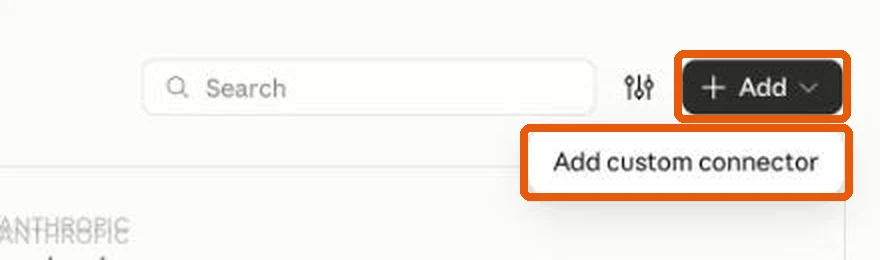
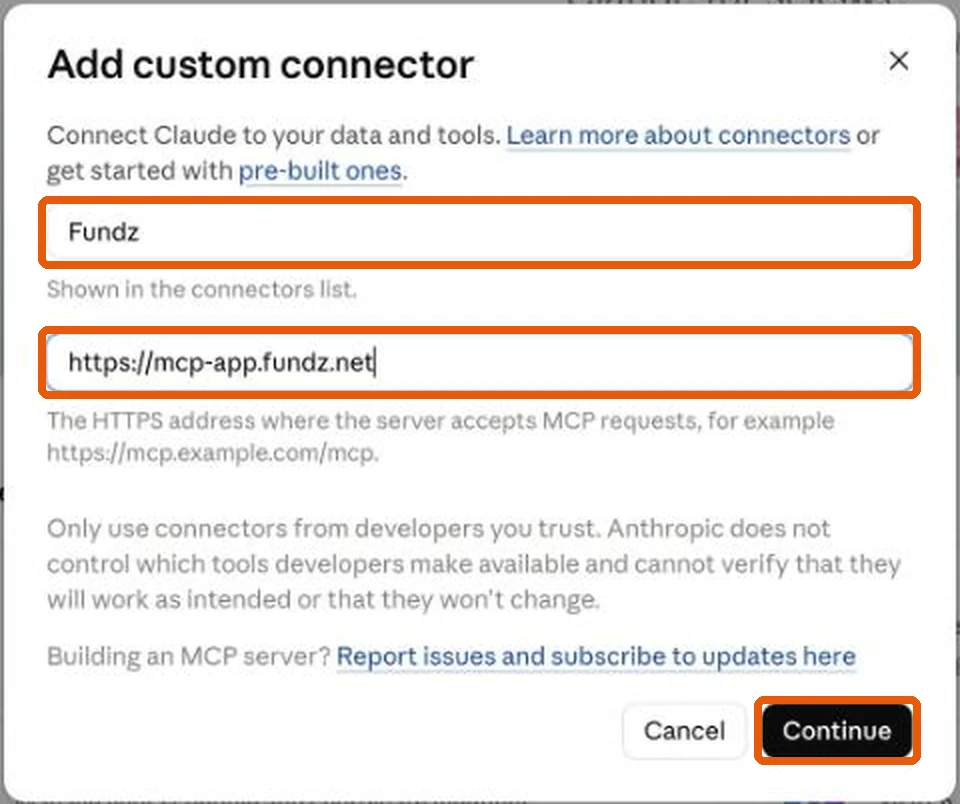
- 3Click Add (top right), then Add custom connector. Type Fundz in Name and https://mcp-app.fundz.net in MCP server URL, exactly that, with nothing after .net. Click Continue.
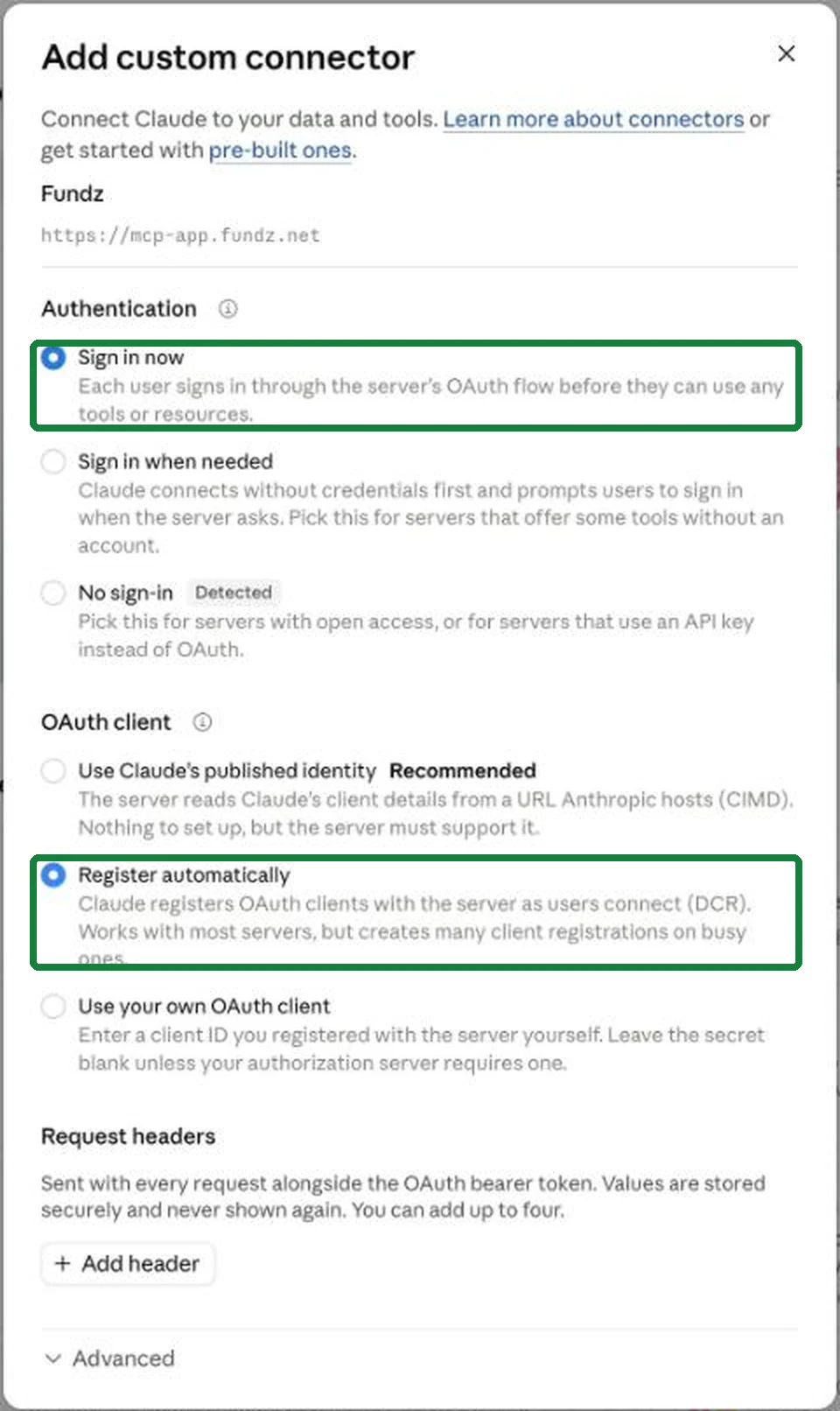
- 4Change the two settings Claude pre-selects. Authentication: choose Sign in now (not "No sign-in", even though Claude marks it "Detected"). OAuth client: choose Register automatically (not "Use Claude’s published identity", even though Claude marks it "Recommended").
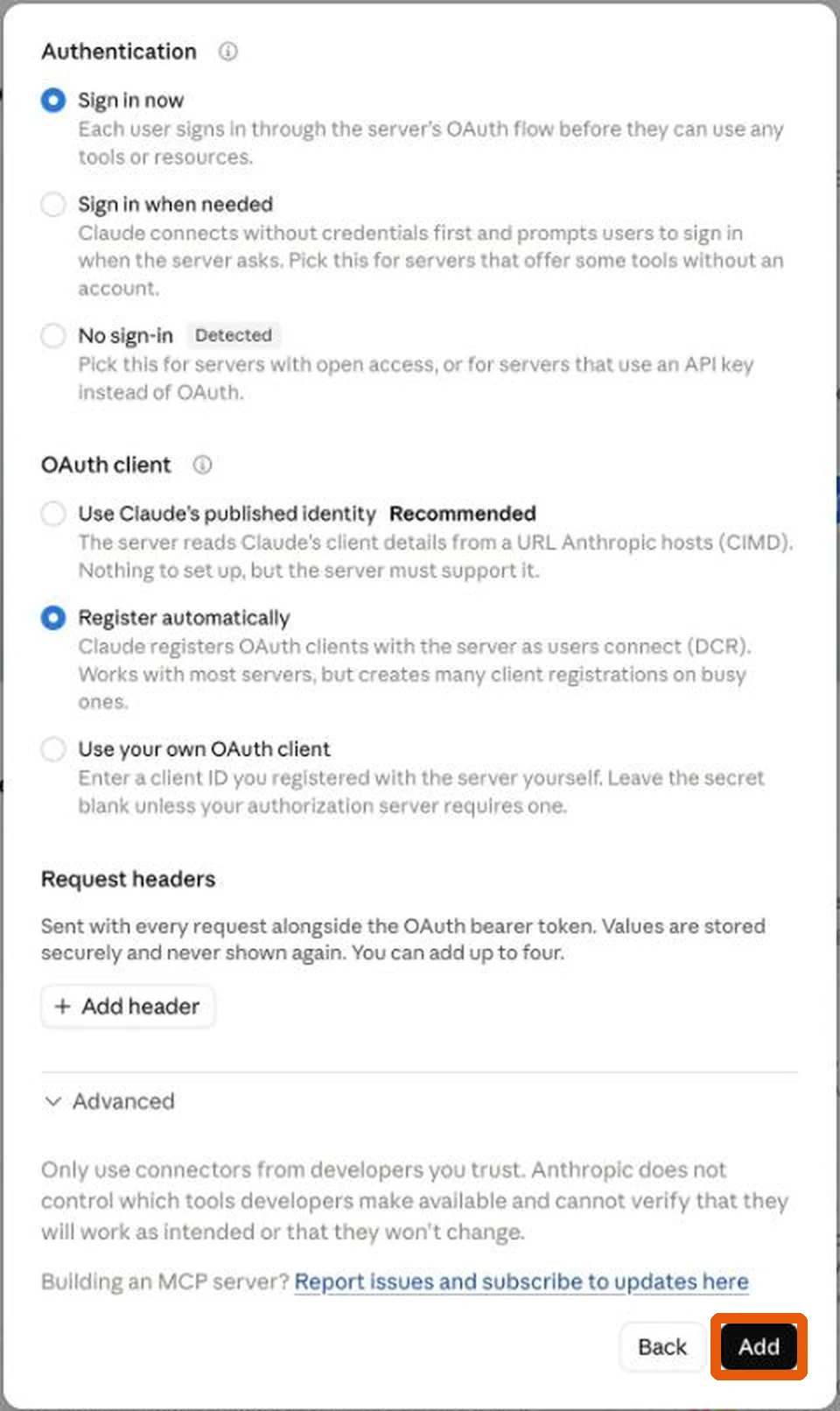
- 5There is no Save button, and nothing saves on its own. Scroll down inside the window, below "Request headers" and "Advanced", and click Add at the very bottom. If you close the window first, your choices are lost.
- 6Fundz now appears in your connector list. Click Connect next to it and approve. There is no key to copy and paste.
- 7Ask it something, for example "what are my daily leads today?". The first time Claude wants to use each Fundz tool it asks; choose Always allow.
"Which of my leads raised money this week?" · "Tell me about Acme Corp and who runs it" · "Find Series A rounds in Ohio this month" · "Add Acme to My Accounts"
Set up by chat
Say Set up Fundz. in a new chat. Claude asks who will work your leads, shows what Fundz already knows about your company for you to confirm or change, then asks where and to whom you sell, one question at a time. It saves your answers to your Fundz account, tells you when your first list of leads is ready (about five minutes after you save), and can go on to draft your first outreach for you to approve. Nothing is sent without you. Each morning after that, ask "Who are we going to sell to today?" for your whole day in one answer. See Set up Fundz with one prompt. The guided setup at app.fundz.net/welcome walks you through connecting and shows when you are connected.
Already connected? Get the newest Fundz tools
Claude keeps the list of Fundz tools from the day you connected. When Fundz adds something new, one click brings it in and you stay signed in.
- 1In Claude, click Customize, then Connectors, then Fundz.
- 2Click the three dots and choose Refresh tools list.
- 3Start a new chat.
What Claude can look up
Your daily leads and targeting, company profiles and the people to contact, funding rounds, executive moves, acquisitions, agreements, product launches, fund formations, crowdfunding, SEC filings, investors, and the companies in My Accounts. It can also search Hiring Intel, Raised & Hiring, Office Expansions and city office build-out permits, and turn your Fundz emails on or off.
"Which companies in my market raised this year and are hiring now?" · "Who signed a new office lease in Texas?" · "Find hiring surges at fintech companies"
Good to know
- 1Revealing a contact's email or phone from Claude uses the same monthly contact allowance as the app.
- 2To disconnect, remove Fundz under Customize, Connectors in Claude.
- 3More examples and what it can do: Fundz in Claude.
- 4Use ChatGPT as well? Connect both: Use Fundz inside ChatGPT.
- 5Trouble connecting? Email support@fundz.net with what Claude shows you.
Last updated November 2026